Firefox only · v1.1.1
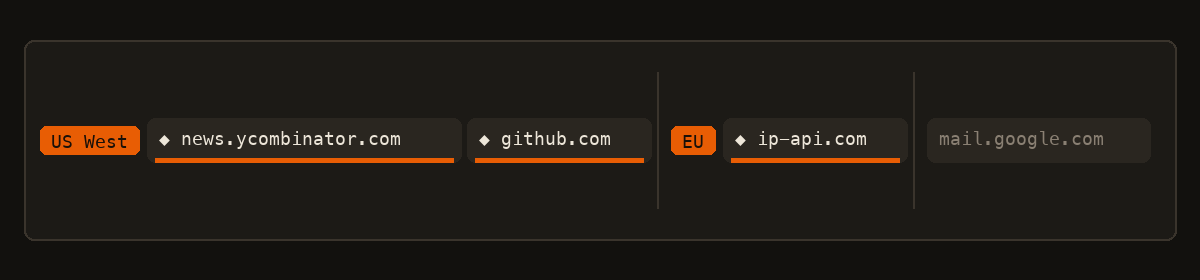
Point any tab at any Outline key.
Name the keys. Put each tab on the one it should use. Several tabs, several keys, at the same time.
Download Outline Tab Install steps
Install
- Download outline-tab.zip and unzip it.
-
In a terminal:
That installs a local helper. macOS includes a prebuilt binary. Linux needs Go 1.25+ to compile.cd outline-tab-1.1.1 ./install.sh - In Firefox open about:debugging#/runtime/this-firefox
- Click Load Temporary Add-on…
- Select
extension/manifest.jsonin the unzipped folder - Paste an
ss://key, name it, arm a tab. Add another key and arm a different tab.
Firefox drops temporary add-ons when it quits. After a restart, load the same
manifest.json again. The helper stays installed.
What it does
Each armed tab is assigned one Outline key. Unarmed tabs stay on your normal connection. Keys are named, so the tab strip shows which server a tab is using.
Firefox can pick a proxy per tab. Chrome cannot, which is why this is Firefox only. Outline speaks Shadowsocks, so a local helper turns each key into SOCKS5 on localhost.
FAQ
- Chrome, Brave, Edge?
- No. Firefox only. Those browsers cannot proxy a single tab. LibreWolf and Zen can load the same add-on.
- Official Outline app?
- No. Independent. You bring your own access keys. Not affiliated with Outline Foundation or Jigsaw.
- Does the developer see my traffic?
- No. Keys stay on your machine. Each armed tab goes to the Outline server in that tab’s key. See the privacy policy.
- WebRTC?
- A page can still learn your real IP through WebRTC. Disable it in Firefox if that matters.